How idenflow works
For IT: how Personio data becomes a plan for Google Workspace, what changes in Google and what you need to set it up.
Connection and sync
People and employments come from the Personio API (v2). A change in Personio triggers a sync through a webhook. On top, there is one every 15 minutes by default and a full pass once a day.
Every sync run shows what it read and planned, and the real error text when something failed. A failed run never reports success.
In the Google directory, idenflow acts as the admin account you enter in its settings. "Check & connect" tests every scope before idenflow starts working with your Google Workspace.
Linking people and accounts
People in Personio are linked to their Google accounts. Anyone without a matching account stays unlinked and shows on the dashboard.
Links are made automatically only on exact evidence: the Personio ID in the Google account, or the same email address, aliases included. Near matches, by name for example, go to a person as proposals.
A rejected proposal does not come back, and sync never changes an existing link. Suspended, archived and admin accounts, and accounts you mark as service or shared accounts, are never linked automatically.
Fields, groups and org units
Any Personio field, custom attributes included, can fill a Google field: 16 standard fields, among them title, department, cost centre, location, manager, phone and desk, or custom attributes (custom schema). The schema is created or extended from the app. The recovery email is written only if you explicitly allow it.
Group membership follows rules on HR data, for example department = Sales → sales@. This needs no Google dynamic groups, so it works on Business editions too.
Sync manages only the groups named in a rule and leaves members of other groups alone. Playbooks change groups only in steps you add. Groups that grant idenflow roles are never managed by a rule or a playbook.
The org unit (OU) follows rules too. When several match, the rule with the lowest priority number wins.
Plan, rules and approval
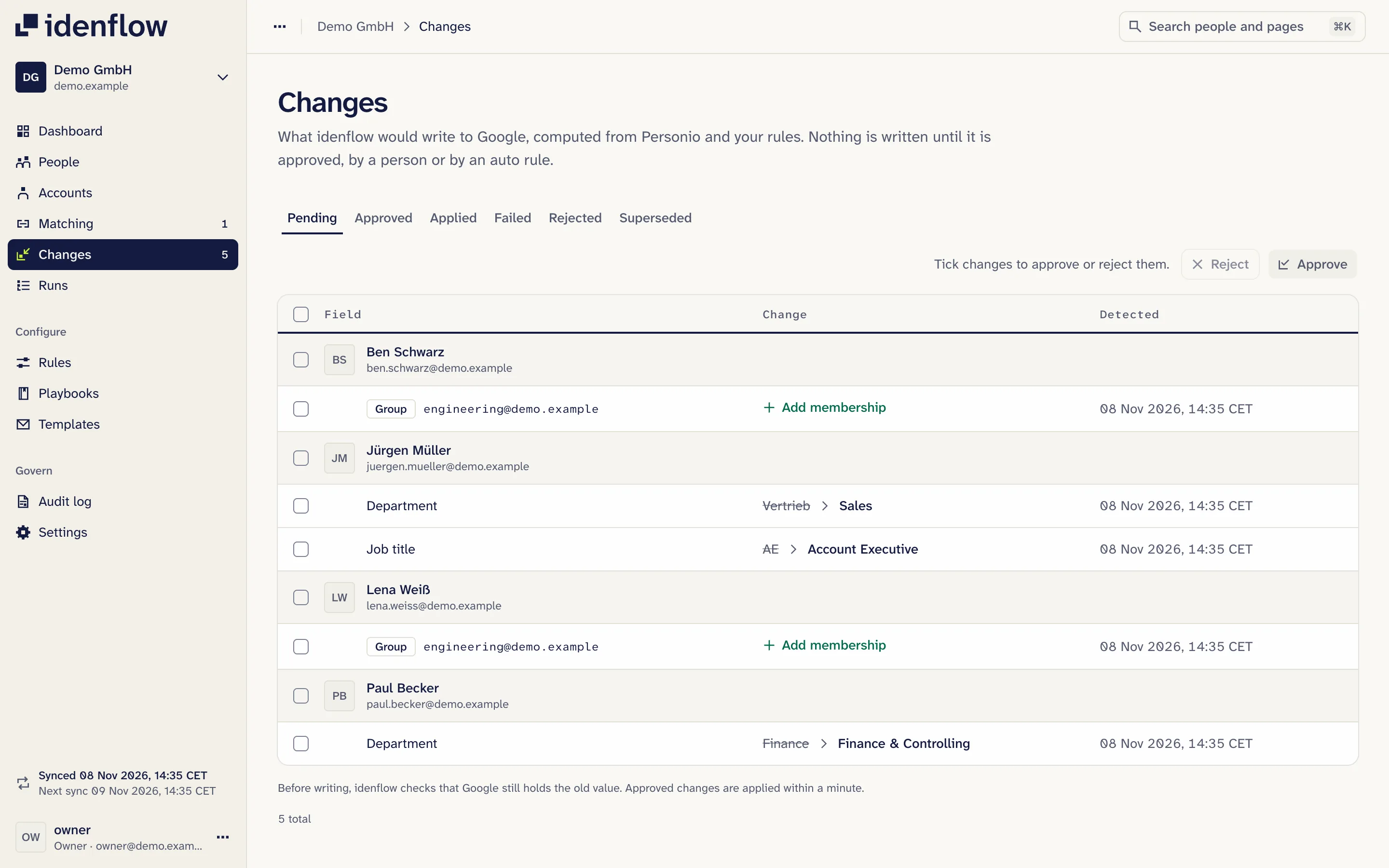
From Personio and Google's current state, idenflow works out what the directory should say and shows each difference as a change with its old and new value.
Each rule is set to review or auto. New rules start on review: their changes wait until someone approves them. Changes from auto rules are written without a person, checked against your rules and logged. You approve or reject changes one by one or in bulk.
Before writing a field or the OU, idenflow reads its current value in Google again. If someone changed it meanwhile, it is not overwritten; the change reports the drift. A rejected change is not proposed again while neither Personio nor Google changes.
Safety limits: a sync that plans more than 50 new changes writes nothing automatically and is held for review. More than 10 leavers in a day, and more than 25 new runs of one playbook in one sync, wait for approval too. These are defaults, and only owners can change them.
There is no undo button for written changes. The old and new value of every written change are in the audit log.
Joiners, movers and leavers
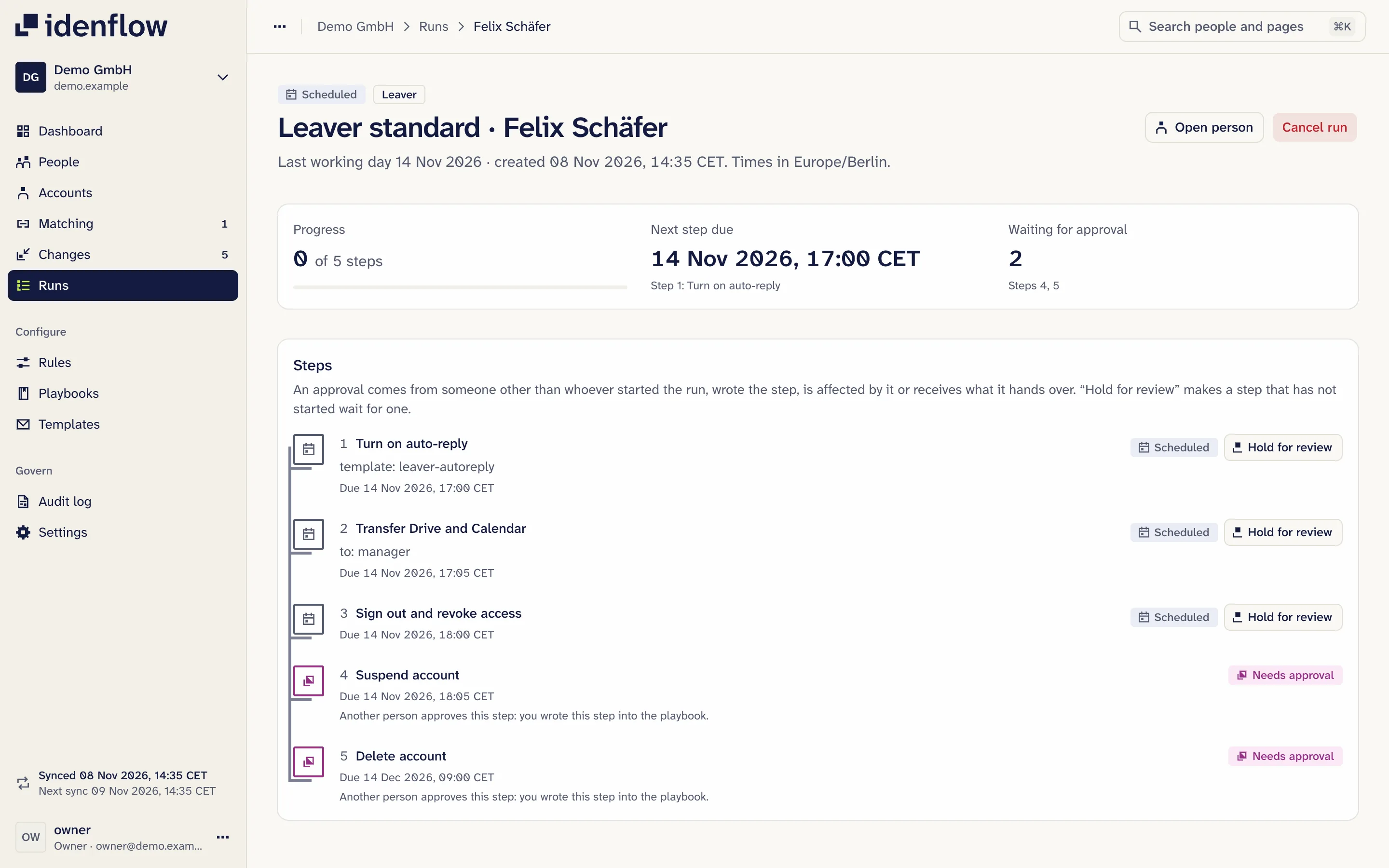
Playbooks for joiners, movers and leavers start from Personio data: the hire date, the last working day or termination date, a change to a watched field. There are also playbooks you start by hand.
Each step is scheduled relative to that date, at a time of day in your time zone, for example 3 days before the start date at 09:00. Every joiner and leaver who matches a playbook's conditions gets the same steps from it. Any step can be marked as needing approval.
A playbook applies from the day you switch it on; nothing starts backwards for the whole company. A dry run shows, for one person, each step, when it runs and what it will do, and warns about empty or unknown variables in mails. When HR changes a date, the run is re-planned.
Joiners
- The Google account is created with the work address from Personio when it is in one of your domains, otherwise from a pattern such as first.last.
- If the address already exists, the step creates nothing and reports it; an existing account is never taken over.
- The first password is random, must be changed at first sign-in and is shared only through a one-time link, never in plain text by mail.
- New accounts can start in an OU that enforces 2-step verification and, by default, move to the OU from your rules only after enrolling. The dashboard shows who has not enrolled yet.
- Mails such as the welcome mail go out from your own Google mailbox, to the private address, the work address or the manager. You write the templates as text with variables from Personio such as first name, department or manager; they are sent in a fixed HTML layout with a plain-text version.
- If you want, the new Google address goes back into a Personio custom attribute.
Movers
- For a mover, for example into another department, the rules re-plan fields, groups, OU and manager. For the groups your rules name, that means removal from the old department's groups and addition to the new one's.
- For fields you watch, a mover playbook can start as well.
- According to Google, whoever leaves a Google group loses access to content shared with it.
Leavers
- Auto-reply, forwarding and mailbox access for the manager. According to Google, a suspended account no longer receives new mail, so auto-reply and forwarding work only until the account is suspended.
- Drive and Calendar data transferred to the manager.
- Signed out of every session, OAuth tokens and app passwords revoked, password reset, recovery details cleared.
- Groups and the licences the account holds removed, account suspended; deleted only with approval. Google Vault and Archived User stay.
- If a hand-over fails, sign-out, licence removal and suspension still run.
- If HR enters a termination weeks late, a leaver run is still created, with every step waiting for approval. If a termination is withdrawn after the hand-over to the manager has begun, the run is held for a person.
- The dashboard shows who has left in Personio but still has an active, linked Google account. A separate step unsuspends a suspended account.
What changes, and what does not
Changes, following your rules and playbooks
- Accounts: create, suspend, unsuspend, delete (with approval only)
- 16 standard fields, such as title, department, cost centre, location, manager, phone and desk
- Custom attributes (custom schema); the schema is created from the app
- Group membership, without dynamic groups, so Business editions work too
- Org units
- Gmail: auto-reply and forwarding until suspension, mailbox delegation (optional scopes)
- Drive and Calendar data at exit
- Sessions, OAuth tokens, app passwords, password and recovery details
- Licences the account holds; Google Vault and Archived User stay
Does not change
- Google admin accounts, unless an owner changes that
- Groups no rule names, through sync; a playbook only in steps you add
- Postal addresses
- 2-step verification itself: the OU's Google policy switches it on
- Data in Personio, except the Google address in a custom attribute, if you want that; never the Personio sign-in field. When you connect, idenflow adds a webhook there
What you need
- Personio Core Pro or Core Enterprise. Personio issues API credentials for custom integrations from Core Pro up.
- Personio API credentials with read access to people and employments, and webhook rights; write access only to one attribute, if the Google address should go back to Personio.
- Google Workspace with a super admin for setup, who adds idenflow's client ID and the scopes shown under domain-wide delegation in the Google Admin console.
- An admin account for idenflow, ideally a dedicated one such as idenflow-svc@ with a custom admin role rather than a super admin. To remove licences, that role must be allowed to manage licences.
- Optional: Gmail scopes for auto-reply, forwarding and mailbox delegation; a Slack connection if Slack profiles (title, phone, pronouns, custom profile fields) should follow Personio too.
- No identity platform. The connection runs directly from Personio to Google Workspace.
IT service providers can look after several client organisations.
Questions from IT
Does idenflow need super admin rights?
For setup, yes: a super admin adds idenflow's client ID and the scopes shown under domain-wide delegation. After that, idenflow acts as an admin account you choose; we recommend a dedicated one such as idenflow-svc@ with a custom admin role. Google admin accounts are left alone by default.
Can I undo a change?
There is no undo button for written changes. Every written change is in the audit log with its old and new value, so you can see what was there before. A separate step unsuspends a suspended account.
Who can change the connections to Personio and Google?
Only an owner. The Personio secret is not shown again after it is saved, and every change is in the audit log. Through the connections, idenflow runs only its fixed steps; there is no free-form API call.
Does idenflow do email signatures?
No. Eigenlaut, another product by Weidhaus (eigenlaut.app), does: it builds Gmail signatures from the Google directory, including the title, department and phone number idenflow fills in from Personio.
Where do idenflow and our data live?
Production is planned on Google Cloud in Frankfurt. Hosting, retention and deletion are covered under Security.
See where Google differs from Personio
Built and tested, not yet in use at any customer. We will offer the free check once idenflow runs in production; you can request it now.